

Shop Online Safely with Extra Protection
Shopping online is fun, but keeping your money safe is serious business. As your local community bank, we want you to feel secure every time you click “buy.” Whether you are using your high yield checking funds or a regular account, we use a smart system called 3D Secure to protect you. If a purchase looks unusual—like if you are shopping online while traveling—we send you a text message with a one-time security code (OTS) to make sure it’s really you!
How to Use Your One-Time Security Code
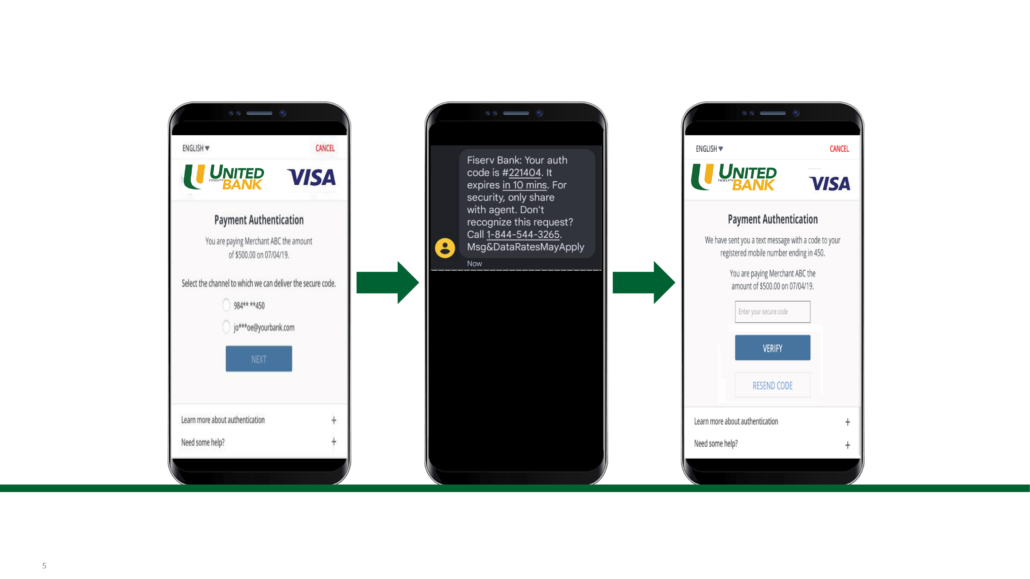
Our secure online shopping tool is very easy to use. It uses a One-Time Password (OTP) sent straight to your phone. Here is how it works:
- Step 1: The Request After you checkout at a store online, a small window may pop up. It will ask for a special security code.
- Step 2: Check Your Phone We will send a text message with a code to your mobile phone right away.
- Step 3: Enter the Code Type the code into the box on your screen. That’s it! Your purchase is safe and complete.
Safety Reminder: Never share your secret code with anyone! We will never call you to ask for this code.
FAQ
Is an OTP required for all online purchases?
No. The password is required only at merchant websites that support 3D Secure (3DS) authentication protocols. Entering the password provides extra security for online transactions.
A transaction originating with a 3D Secure merchant passes through a risk-assessment process. If the authorization is considered a higher risk or out of normal activity, a code will be generated to validate the purchase.
How do I know if an online merchant is a 3DS enabled merchant?
How can I register or update my contact information?
Please call a Customer Service Specialist at 1-800-280-8280 or visit your local banking center to update any account information.
What if I am unable to successfully complete the OTP challenge or it fails?
If you receive a failed authentication or an error message, contact a Customer Service Specialist at 1-800-280-8280 or visit your local banking center.
